Most common reasons for errors:
- GIS ID does not match spatial GIS_LINK
Tip: If the Phoenix GIS ID and spatial GIS_LINK seem to match, copy the GIS_LINK into a text file. If the cursor lands on the line below the GIS_LINK value then there may be a carriage return/line feed at the end. Remove it or delete and re-enter the GIS_LINK. - Feature is not in the spatial data, or
- There are duplicate features with the same GIS_LINK in one or more shape file(s)
Note: Duplicate features could potentially be in the same shape file or separate shape files. - One or more records in Phoenix have the same GIS ID (GIS IDs must be unique).
Error messages are in two parts separated by a comma: Feature Type, Feature Identification
Eg. Error linking to spatial: OP_SU, Block 1:SU B
"OP_SU" = Feature Type
"Block 1:SU B" = Feature identification
Feature Types
HACP = Harvest Application (permit) - FTA Harvest Application with CP.
This is a non-spatial feature for most submissions, however, spatial data must always contain a LICENCE and a CP attribute with values matching the Opening Details page to accommodate special instances where this feature has a spatial component (Salvage CP)
HACP_BLK = CutBlock - FTA Harvest Application with CP (gross block boundary)
RP_SEC = Road Section - FTA Road Permit Application
HANOCP = Harvest Application (permit/licence) - FTA Harvest Application with NO CP (harvest application or cutblock boundary)
HANOCP_BLK = CutBlock - FTA Harvest Application with NO CP
OP = Opening - RESULTS Opening: New/Correction (gross block boundary)
OP_SU = Standard Unit - RESULTS Opening: New/Correction (standard unit boundary)
OP_VAR = Opening - RESULTS Opening Approved Variation (gross block boundary)
OP_SU_VAR = Standard Unit - RESULTS Opening Approved Variation (standard unit boundary)
OP_AMEND = Opening - RESULTS Opening Amendment (gross block boundary)
OP_SU_AMEND = Standard Unit - RESULTS Opening Amendment (standard unit boundary)
DIST = Disturbed area- RESULTS Disturbance (disturbance or gross block boundary)
FC = Stratum - RESULTS Forest Cover (stratum boundary)
ACT = Activity - RESULTS Activity (activity boundary)
MILE = Milestone - RESULTS Milestone Declaration
Feature identification examples
A12345_247_135 (Licence_CP_Block)
A12345_247_135:SU A (File ID:SU + SU ID)
A12345_247_135:Stratum B (File ID: Stratum + Stratum ID)
A12345_247_135:CCRES-G:12.3 (File ID:Disturbance Activity Name:Area)
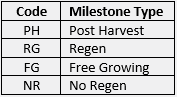
Block 1:SU B:PH (File ID:SU:Milestone Type)
Milestone Type Codes
Activities
Survey
Block1:SURVEY FG PLOT:2017-05-31:1A:31.7 (File ID:Activity Name:Completed Date:SU:Stratum:Area)
Planting
Block1:PL PL CTAIN:2017-05-31:1A:21.0 (File ID:Activity Name:Completed Date:Unit:Area)
All Other Activities
Block1:Juvenile Spacing:2017-05-31:31.7 (File ID: Activity Name: Completed Date:Area)